UnityCatalogServer — Localhost Reference Server
UnityCatalogServer is Unity Catalog's Localhost Reference Server.
UnityCatalogServer can be started as a command-line application using the bin/start-uc-server shell script.
$ ./bin/start-uc-server
###################################################################
#  _    _       _ _            _____      _        _              #
# | |  | |     (_) |          / ____|    | |      | |             #
# | |  | |_ __  _| |_ _   _  | |     __ _| |_ __ _| | ___   __ _  #
# | |  | | '_ \| | __| | | | | |    / _` | __/ _` | |/ _ \ / _` | #
# | |__| | | | | | |_| |_| | | |___| (_| | || (_| | | (_) | (_| | #
#  \____/|_| |_|_|\__|\__, |  \_____\__,_|\__\__,_|_|\___/ \__, | #
#                      __/ |                                __/ | #
#                     |___/                        v0.5.0  |___/  #
###################################################################
UnityCatalogServer command-line application starts the Unity Catalog API services (with the Armeria documentation service at http://localhost:8080/docs).
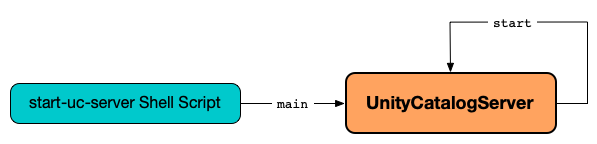
Launch UnityCatalogServer Command-Line Application
void main(
  String[] args)
main is the entry point of bin/start-uc-server shell script.
main performs the following steps in order:
- Creates an
OptionParserto parse the command-line options (args). - Creates a
UnityCatalogServer.Builderand sets its port to the value of the--portoption incremented by1. - Requests the
UnityCatalogServer.Builderto build aUnityCatalogServerinstance - Prints the welcome ASCII art message.
- Starts the
UnityCatalogServer. -
Creates a URLTranscoderVerticle bound to the following ports:
Port Role 8080or--portTranscode port (inbound) 8081or--port + 1Service port (forwarded) -
Deploys the
URLTranscoderVerticleon a non-clustered Vert.x instance.
Create UnityCatalogServer.Builder
UnityCatalogServer.Builder builder()
builder creates a new UnityCatalogServer.Builder.
Static Method
builder is a Java class method to be invoked without a reference to a particular object.
Learn more in the Java Language Specification.
builder is used when:
UnityCatalogServeris launched as a command-line application
Armeria Server
UnityCatalogServer initializes an Armeria Server when created.
The server is started to listen to service requests when the UnityCatalogServer is requested to start. It is stopped when the UnityCatalogServer is requested to stop.
Initialize
Server initializeServer(
  UnityCatalogServer.Builder unityCatalogServerBuilder)
initializeServer creates an Armeria Server (Armeria) to listen on the HTTP port (of the given UnityCatalogServer.Builder) on all available network interfaces.
initializeServer creates a HibernateConfigurator (for the serverProperties).
initializeServer registers the Unity Catalog API services (based on the serverProperties) with the following auxiliary services:
- Built-in Armeria documentation service (Armeria) under
/docspath (e.g., http://localhost:8081/docs/) - Repositories (and initMetastoreIfNeeded)
- UnityCatalogAuthorizer
initializeServer adds the security decorators.
initializeServer builds a newly-created Armeria Server.
Register Unity Catalog API Services
void addApiServices(
  ServerBuilder armeriaServerBuilder,
  UnityCatalogServer.Builder unityCatalogServerBuilder,
  ServerProperties serverProperties,
  UnityCatalogAuthorizer authorizer,
  Repositories repositories)
addApiServices prints the following INFO message to the logs:
Adding Unity Catalog API services...
addApiServices creates a CloudCredentialVendor unless defined using the given UnityCatalogServer.Builder.
addApiServices creates a StorageCredentialVendor.
addServices registers the Unity Catalog API services.
| URL | Service |
|---|---|
/ | Returns Hello, Unity Catalog! message |
/api/1.0/unity-control/auth | AuthService |
/api/1.0/unity-control/scim2/Me | Scim2SelfService |
/api/1.0/unity-control/scim2/Users | Scim2UserService |
/api/2.1/unity-catalog/ | |
/api/2.1/unity-catalog/catalogs | CatalogService |
/api/2.1/unity-catalog/credentials | CredentialService |
/api/2.1/unity-catalog/delta/preview/commits | DeltaCommitsService |
/api/2.1/unity-catalog/external-locations | ExternalLocationService |
/api/2.1/unity-catalog/functions | FunctionService |
/api/2.1/unity-catalog/iceberg | IcebergRestCatalogService |
/api/2.1/unity-catalog/models | ModelService |
/api/2.1/unity-catalog/permissions | PermissionService |
/api/2.1/unity-catalog/schemas | SchemaService |
/api/2.1/unity-catalog/staging-tables | StagingTableService |
/api/2.1/unity-catalog/tables | TableService |
/api/2.1/unity-catalog/temporary-model-version-credentials | TemporaryModelVersionCredentialsService |
/api/2.1/unity-catalog/temporary-path-credentials | TemporaryPathCredentialsService |
/api/2.1/unity-catalog/temporary-table-credentials | TemporaryTableCredentialsService |
/api/2.1/unity-catalog/temporary-volume-credentials | TemporaryVolumeCredentialsService |
/api/2.1/unity-catalog/volumes | VolumeService |
addServices prints the following INFO message to the logs while registering IcebergRestCatalogService:
Adding Iceberg services...
addServices prints the following INFO message to the logs while registering DeltaApiService:
Adding UC Delta API services...
Register Unity Catalog API Security Decorators
void addSecurityDecorators(
  ServerBuilder armeriaServerBuilder,
  ServerProperties serverProperties,
  UnityCatalogAuthorizer authorizer,
  Repositories repositories)
addSecurityDecorators does nothing (noop) for server.authorization configuration property disabled.
With server.authorization configuration property enabled, addSecurityDecorators prints the following INFO message to the logs:
Enabling security decorators...
addServices registers the Unity Catalog API service decorators.
| HTTP Service Decorator | Path Prefix |
|---|---|
| UnityAccessDecorator |
|
| AuthDecorator |
|
Start
void start()
start prints out the following INFO message to the logs:
Starting Unity Catalog server...
start requests this Armeria Server to start (and listen to the defined ports). It waits until this Server is fully started up.
start prints out the following INFO message to the logs:
Unity Catalog server started.
Stop
void stop()
Testing Only
stop is used for testing only.
stop requests this Armeria Server to stop and waits until it is stopped.
stop prints out the following INFO message to the logs:
Unity Catalog server stopped.
Metastore
UnityCatalogServer runs with a single metastore only that can be created unless available already.
The summary of the single metastore is available through MetastoreService at /api/2.1/unity-catalog/ URL.
Configuration Files
UnityCatalogServer uses the following configuration files:
etc/conf/server.log4j2.properties- etc/conf/server.properties
SecurityContext
UnityCatalogServer creates a SecurityContext when created as follows:
| Property | Value |
|---|---|
| Configuration Directory | etc/conf |
| securityConfiguration | SecurityConfiguration |
| Service Name | server |
| Local Issuer | internal |
This SecurityContext is used to create an AuthService.
Creating Instance
UnityCatalogServer takes the following to be created:
While being created, UnityCatalogServer does the following:
- Initializes the logging (using
etc/conf/server.log4j2.propertiesconfiguration file). - Sets the default values for the port and server properties (unless set).
- Initializes this securityContext, serverProperties and server
Review
While being created, UnityCatalogServer builds the Server:
- Handle HTTP requests at the given port
- Bind the Armeria documentation service (Armeria) under
/docsURL - Register the API services
UnityCatalogServer is created when:
UnityCatalogServercommand-line utility is started
setDefaults
void setDefaults(
  UnityCatalogServer.Builder unityCatalogServerBuilder)
setDefaults sets the port and serverProperties to their default values unless defined:
| Property | Default |
|---|---|
| port | 8080 |
| serverProperties | etc/conf/server.properties |
Logging
Enable ALL logging level for io.unitycatalog.server.UnityCatalogServer logger to see what happens inside.
Add the following line to etc/conf/server.log4j2.properties:
logger.UnityCatalogServer.name = io.unitycatalog.server.UnityCatalogServer
logger.UnityCatalogServer.level = all
Refer to Logging.